Habit tracker with vacation mode: pause a streak without losing it
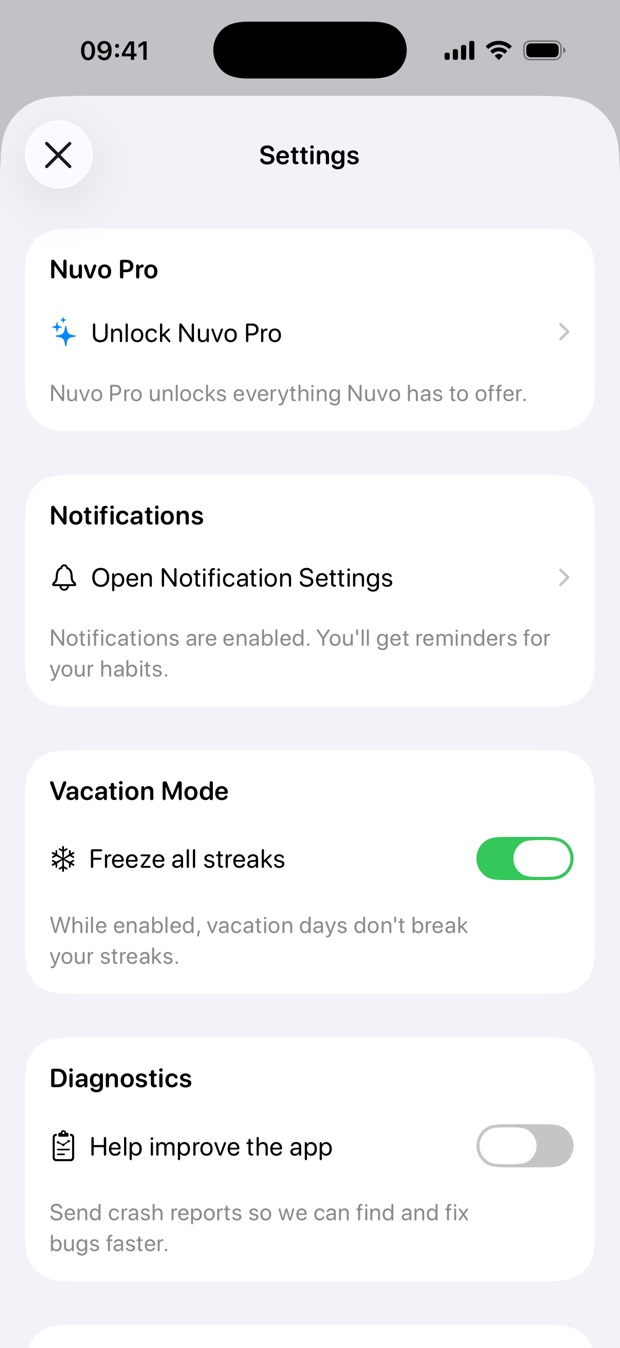
Turn on vacation mode in Settings before you leave. While it is on, the days you miss break nothing, and every streak carries on at its old length when you switch it back off.
Time off should not look like giving up
To a daily streak counter, a fortnight in Portugal and a fortnight of quietly abandoning the habit look identical. Both are fourteen missed days.
That is backwards, and people work around it in worse ways: faking check-ins from a hotel, or opening the app on the last evening of the holiday to tap through a week of days that never happened. At that point the number stops meaning anything.
Turning on vacation mode
The footer under the switch says what it does: while enabled, vacation days don't break your streaks. It applies to every habit at once, so there is nothing to set per habit before a trip.
Nuvo keeps the period rather than just the switch position, so the frozen days stay frozen in your history afterwards. A month later the calendar still shows those days as time off and not as misses.
- Open SettingsTap the gear in the top left of the habit list.
- Find Vacation ModeScroll to the Vacation Mode card.
- Freeze all streaksTurn the switch on before the first day you will be away.
- Turn it off when you are backStreaks continue at the length they had when you left.
You can still check in while it is on
Freezing streaks does not lock anything. If you read on the plane, check in. The day counts as a success, the streak grows, and the days you skip simply do not count against you.
This matters for habits that travel well. Reading, stretching and writing are usually easier on holiday than at home, and there is no reason to lose that progress because the switch is on.
Archive is for endings, vacation mode is for gaps
A habit that belonged to a past season does not need freezing. Swipe it left on the list and it moves to the archive with every check-in intact. The list gets shorter and nothing is destroyed.
From the archive screen, swipe right to restore a habit or left to delete it for good. Marathon training in spring, back in the archive in July, restored next January: the streak picks up from where the history left off.
Questions about this
Does vacation mode count the days as completed?
No. Frozen days are neither successes nor misses. They are skipped when the streak is calculated, so the number pauses rather than growing while you are away.
Do I have to switch it on for each device?
No. The vacation period is part of your data, so it travels over iCloud and applies on your iPhone and iPad at the same time.