How to set habit reminders that actually work
Set the reminder for the moment just before the habit becomes possible, not the moment it is due. A nudge at 18:45 while you are still at your desk gets you to the gym. The same nudge at 20:00, once you are on the sofa, gets swiped away.
Why reminders stop working after a week
Notification blindness arrives fast. A banner you have dismissed six times stops registering as information and becomes something your thumb clears on the way to something else.
There are two causes and they compound. The time is wrong, so acting on the reminder would mean abandoning whatever you are doing. And the reminder arrives whether or not you already did the thing, which teaches you that it carries no information worth reading.
Aim at the decision, not at the deed
For every habit there is a moment when doing it is still cheap, and a later moment when it costs a change of plan. Reminders belong at the first one.
Evening run: remind at the end of the working day, not after dinner. Reading: remind when you would otherwise open a browser, not at midnight. Vitamins: remind while you are still in the kitchen. The question is not “when should this happen” but “when is the last easy moment to start”.
Setting a reminder in Nuvo
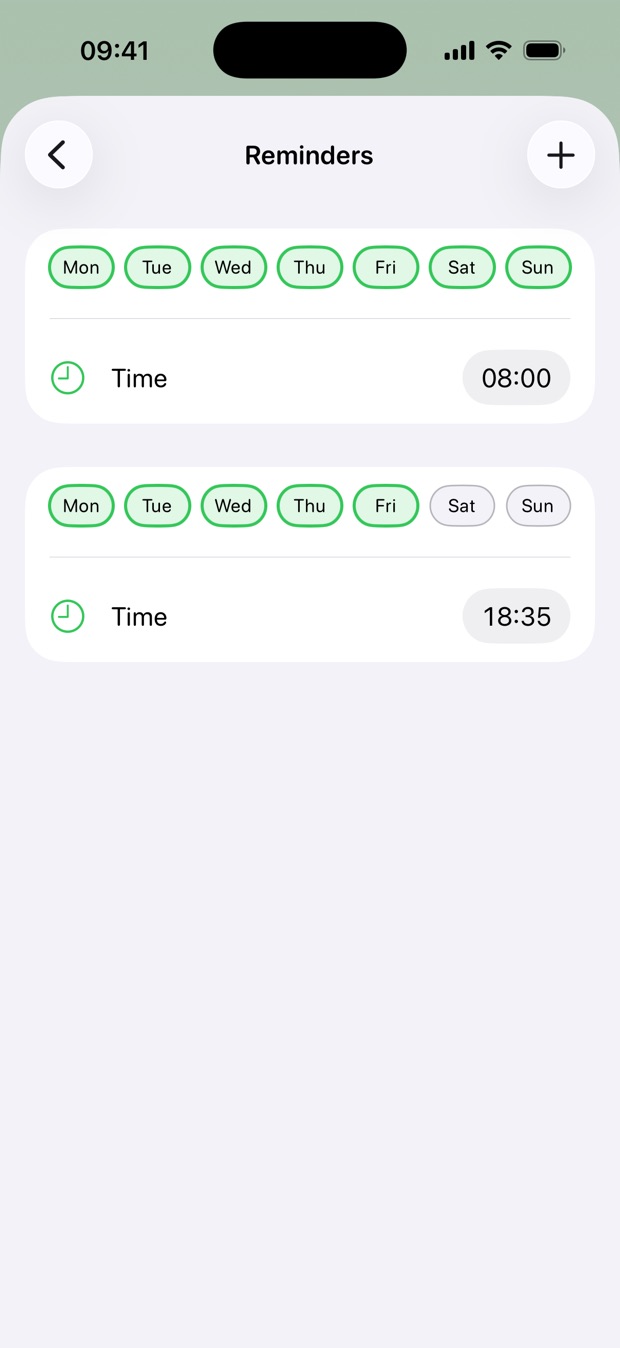
Reminders are set per weekday. Most people's Tuesday and Saturday are not the same shape, and a single time that fits both usually fits neither. A workday reminder at 18:45 and a weekend one at 10:00 will both land.
- Open the habitTap it on the list and tap the pencil in the top right.
- Open RemindersTap the Reminders row.
- Add a weekTap Add Week and set a time for each weekday you want a reminder on.
- SaveTap the check mark. iOS asks for notification permission the first time.
One reminder or several
The free version gives each habit one reminder, which is enough when the habit has one obvious slot. Nuvo Pro allows multiple reminders on the same habit, each with its own weekdays and its own time, which earns its place as soon as a habit has more than one natural window: a morning attempt and an evening fallback, or a different time at the weekend.
Resist filling every slot you are given. Three notifications for one habit is how blindness starts. iOS also keeps only a limited number of scheduled notifications per app at any one time, so reminders spread thinly over a lot of habits are the first to quietly go missing.
Delete the reminder once it has done its job
A reminder is scaffolding. Once the habit has acquired its own cue, finishing work, brushing teeth, sitting down with coffee, the notification is just noise arriving after the fact.
A good sign that the moment has come: you have checked the habit in before the reminder fires, several days running. Turn it off then. You can always put it back.
Questions about this
Why am I not getting notifications?
Check that notifications are allowed for Nuvo in iOS Settings, and check where the habit sits in your list: in the free version, habits past the first two are locked and get no reminders.
How many reminders can one habit have?
One in the free version. Nuvo Pro allows multiple reminders on the same habit, each with its own weekdays and time. Worth knowing in the other direction: iOS caps how many notifications an app can have scheduled at once, so the practical ceiling across all your habits is the system's, not Nuvo's.